> For the complete documentation index, see [llms.txt](https://doc.ssteknoloji.com/pulsar/llms.txt). Markdown versions of documentation pages are available by appending `.md` to page URLs; this page is available as [Markdown](https://doc.ssteknoloji.com/pulsar/overview.md).
# Overview
**Business Rule Design and Management System (BRMS)**
Pulsar
## Pulsar
Pulsar is a flexible and efficient solution that automates decision-making processes and reduces the need for manual intervention. It helps businesses make more informed decisions, reduce costs, and enhance the customer experience.
***
### Benefits
* **Efficiency:**\
Our user-friendly interface is designed for business users to easily understand and operate. Rule changes can be made with just a few clicks—no need for IT support. Simply update the rule, and Pulsar takes care of the rest.
* **Centralization:**\
Even if you have multiple teams and multi-channel applications, you can manage all your rules from a single centralized platform. You can view all changes and easily revert to previous versions of any rule.
* **Agility:**\
Designing rules is as easy as preparing an Excel sheet, and they can be tested instantly. When you're ready, you can deploy them with a single click.
* **Sustainability:**\
By decoupling business rules from code, Pulsar enables a manageable and sustainable structure that supports long-term maintainability.
***
### Features
* **Business-Friendly:**\
Business users can modify existing rules or add new ones without needing assistance from IT.
* **Decision Table:**\
Complex rules can be easily modeled using decision tables designed in a matrix structure.
* **Versioning:**\
Rules are version-controlled to maintain historical records and ensure stable operation.
* **Categorization:**\
With tree-structured categories, navigating between rules becomes easier, and authorization can be managed on a category basis.
* **Excel Integration:**\
Pulsar allows importing and exporting decision table data via Excel files, enabling easy bulk data management.
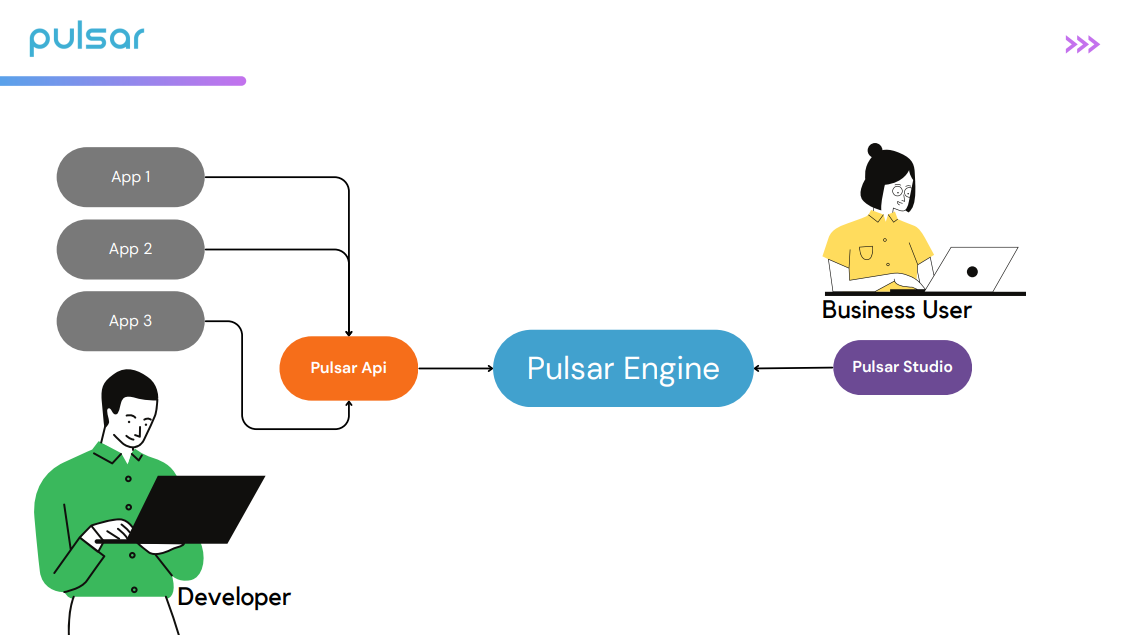
## **How It Works?**